10x Visium
Run Space Ranger tools using spaceranger_workflow
spaceranger_workflow wraps Space Ranger to process 10x Visium data.
Note
Space Ranger will send anonymized telemetry data to 10x Genomics starting from v4.0. Here is the details on Space Ranger Pipeline Telemetry.
This option has been turned off in this spaceranger_workflow, thus no data will be sent to 10x Genomics.
A Step-by-step instruction
The workflow starts with FASTQ files.
Note
Starting from v3.0.0, Cumulus spaceranger_workflow drops support for mkfastq. If your data start from BCL files, please first run BCL Convert to demultiplex folwcells to generate FASTQ files.
1. Import spaceranger_workflow
Import spaceranger_workflow workflow to your workspace by following instructions in Import workflows to Terra. You should choose workflow github.com/lilab-bcb/cumulus/Spaceranger to import.
Moreover, in the workflow page, click the
Export to Workspace...button, and select the workspace to which you want to export spaceranger_workflow workflow in the drop-down menu.
2. Upload sequencing and image data to Google bucket
Copy your FASTQ files to your workspace bucket using gcloud storage (you already have it if you’ve installed Google cloud SDK) in your unix terminal.
You can obtain your bucket URL in the dashboard tab of your Terra workspace under the information panel.
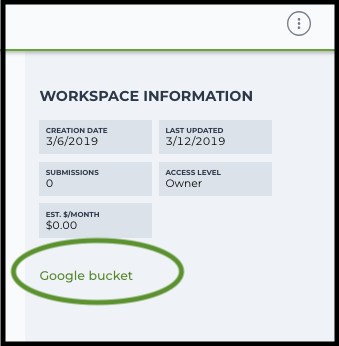
There are two cases:
Case 1: All the FASTQ files are in one top-level folder. Then you can simply upload this folder to Cloud, and in your sample sheet, make sure Sample names are consistent with the filename prefix of their corresponding FASTQ files.
Case 2: In the top-level folder, each sample has a dedicated subfolder containing its FASTQ files. In this case, you need to upload the whole top-level folder, and in your sample sheet, make sure Sample names and their corresponding subfolder names are identical.
Notice that if your FASTQ files are downloaded from the Sequence Read Archive (SRA) from NCBI, you must rename your FASTQs to follow the Illumina file naming conventions.
Example:
gcloud storage cp -r /foo/bar/fastq_path/K18WBC6Z4/Fastq gs://fc-e0000000-0000-0000-0000-000000000000/K18WBC6Z4_fastqwhere
-rmeans copy the directory recursively, andfc-e0000000-0000-0000-0000-000000000000should be replaced by your own workspace Google bucket name.Similarly, copy all images for spatial data to the same google bucket.
Alternatively, users can submit jobs through command line interface (CLI) using altocumulus, which will smartly upload FASTQ files to cloud.
3. Prepare a sample sheet
3.1 Sample sheet format:
Please note that the columns in the CSV can be in any order, but that the column names must match the recognized headings.
For FFPE data, ProbeSet column is mandatory.
The sample sheet describes how to generate gene-count matrices from sequencing reads.
A brief description of the sample sheet format is listed below (required column headers are shown in bold).
Column
Description
Sample
Contains sample names. Each 10x channel should have a unique sample name.
Reference
Provides the reference genome used by Space Ranger for each 10x channel. The elements in the reference column can be either keywords of pre-built references (see the list in this section below) or Google bucket URLs to reference tarballs.
Flowcell
Indicates the cloud URI of the uploaded folder containing FASTQ files for each sample.
ProbeSet
"".Image
Cloud bucket url for a brightfield tissue H&E image in .jpg or .tiff format. This column is mutually exclusive with DarkImage and ColorizedImage columns.
DarkImage
Cloud bucket urls for Multi-channel, dark-background fluorescence image as either a single, multi-layer .tiff file, multiple .tiff or .jpg files, or a pre-combined color .tiff or .jpg file. If multiple files are provided, please separate them by ‘;’. This column is mutually exclusive with Image and ColorizedImage columns.
ColorizedImage
Cloud bucket url for a color composite of one or more fluorescence image channels saved as a single-page, single-file color .tiff or .jpg. This column is mutually exclusive with Image and DarkImage columns.
CytaImage
Cloud bucket url for a brightfield image generated by the CytAssist instrument.
Slide
Visium slide serial number. If both Slide and Area are empty, the
--unknown-slideoption would be set.Area
Visium capture area identifier. Options for Visium are A1, B1, C1, D1. If both Slide and Area are empty, the
--unknown-slideoption would be set.SlideFile
Slide layout file indicating capture spot and fiducial spot positions. Only required if internet access is not available.
LoupeAlignment
Alignment file produced by the manual Loupe alignment step.
Pre-built scRNA-seq references are summarized below:
Keyword
Description
GRCh38-2024-A
Human GRCh38 (GENCODE v44/Ensembl 110). Notice: This reference is only supported by Space Ranger v4.0.1+.
GRCm39-2024-A
Mouse GRCm39 (GENCODE vM33/Ensembl 110). Notice: This reference is only supported by Space Ranger v4.0.1+.
GRCh38-2020-A
Human GRCh38 (GENCODE v32/Ensembl 98)
mm10-2020-A
Mouse mm10 (GENCODE vM23/Ensembl 98)
The list of available Visium probe sets is below:
Probe Set
Genome Reference
Compatible Assay
Space Ranger version
human_probe_v2.1
GRCh38-2024-A
Visium HD, Visium CytAssist
v4.0+
human_probe_v2
GRCh38-2020-A
Visium HD, Visium CytAssist
v3.0+
human_probe_v1
GRCh38-2020-A
Visium CytAssist
v2.0+
mouse_probe_v2.1
GRCm39-2024-A
Visium HD, Visium CytAssist
v4.0+
mouse_probe_v2
mm10-2020-A
Visium HD, Visium CytAssist
v3.0+
mouse_probe_v1
mm10-2020-A
Visium CytAssist
v2.0+
The sample sheet supports sequencing the same 10x channels across multiple flowcells. If a sample is sequenced across multiple flowcells, simply list it in multiple rows, with one flowcell per row. In the following example, we have 2 samples sequenced in two flowcells.
Example:
Sample,Reference,ProbeSet,Flowcell,Image,Slide,Area
sample_1,GRCh38-2024-A,human_probe_v2.1,gs://fc-e0000000-0000-0000-0000-000000000000/VK18WBC6Z4/Fastq,gs://image/image1.tif,V19J25-123,A1
sample_2,GRCh38-2020-A,,gs://fc-e0000000-0000-0000-0000-000000000000/VK18WBC6Z4/Fastq,gs://image/image2.tif,V19J25-123,B1
sample_1,GRCh38-2024-A,human_probe_v2.1,gs://fc-e0000000-0000-0000-0000-000000000000/VK10WBC9Z2/Fastq,gs://image/image1.tif,V19J25-123,A1
sample_2,GRCh38-2020-A,,gs://fc-e0000000-0000-0000-0000-000000000000/VK10WBC9Z2/Fastq,gs://image/image2.tif,V19J25-123,B1
3.2 Upload your sample sheet to the workspace bucket:
Example:
gcloud storage cp /foo/bar/projects/sample_sheet.csv gs://fc-e0000000-0000-0000-0000-000000000000/
4. Launch analysis
In your workspace, open
spaceranger_workflowinWORKFLOWStab. Select the desired snapshot version (e.g. latest). SelectRun workflow with inputs defined by file pathsas below
and click
SAVEbutton. SelectUse call cachingand clickINPUTS.Then fill in appropriate values in the
Attributecolumn. Alternative, you can upload a JSON file to configure input by clickingDrag or click to upload json.Once INPUTS are appropriated filled, click
RUN ANALYSISand then clickLAUNCH.
Visium spatial transcriptomics data
Workflow input
For spatial data, spaceranger_workflow takes sequencing reads as input (FASTQ files, or TAR files containing FASTQ files), and runs spaceranger count. Revalant workflow inputs are described below, with required inputs highlighted in bold.
Name
Description
Example
Default
input_csv_file
Sample Sheet (contains Sample, Reference, Flowcell, Lane, Index as required and ProbeSet, Image, DarkImage, ColorizedImage, CytaImage, Slide, Area, SlideFile, LoupeAlignment as optional)
“gs://fc-e0000000-0000-0000-0000-000000000000/sample_sheet.csv”
output_directory
Output directory
“gs://fc-e0000000-0000-0000-0000-000000000000/spaceranger_output”
Results are written under directory output_directory and will overwrite any existing files at this location.
reorient_images
For use with automatic fiducial alignment. This option will apply to all samples in the sample sheet. Spaceranger will attempt to find the best alignment of the fiducial markers by any rotation or mirroring of the image.
true
true
filter_probes
Whether to filter the probe set using the “included” column of the probe set CSV.
true
true
dapi_index
Index of DAPI channel (1-indexed) of fluorescence image, only used in the CytaAssist case, with dark background image.
2
unknown_slide
Use this option if the slide serial number and area identifier have been lost. Choose from visium-1, visium-2 and visium-2-large.
visium-2
no_bam
Turn this option on to disable BAM file generation.
false
false
secondary
Perform Space Ranger secondary analysis (dimensionality reduction, clustering, etc.)
false
false
r1_length
Hard trim the input Read 1 to this length before analysis
28
r2_length
Hard trim the input Read 1 to this length before analysis. This value will be set to 50 automatically for FFPE samples if spaceranger version < 2.0.0.
50
spaceranger_version
spaceranger version, could be: 4.1.0, 4.0.1, 3.1.3, 3.0.1
“4.1.0”
“4.1.0”
docker_registry
Docker registry to use for spaceranger_workflow. Options:
“quay.io/cumulus” for images on Red Hat registry;
“cumulusprod” for backup images on Docker Hub.
“quay.io/cumulus”
“quay.io/cumulus”
acronym_file
“s3://xxxx/index.tsv”
“gs://cumulus-ref/resources/cellranger/index.tsv”
zones
Google cloud zones. For GCP Batch backend, the zones are automatically restricted by the Batch settings.
“us-central1-a us-west1-a”
“us-central1-a us-central1-b us-central1-c us-central1-f us-east1-b us-east1-c us-east1-d us-west1-a us-west1-b us-west1-c”
num_cpu
Number of cpus to request for one node for spaceranger count
32
32
memory
Memory size string for spaceranger count
“120G”
“120G”
count_disk_space
Disk space in GB needed for spaceranger count
500
500
preemptible
Number of preemptible tries. Only works for GCP
2
2
awsQueueArn
The AWS ARN string of the job queue to be used. Only works for AWS
“arn:aws:batch:us-east-1:xxx:job-queue/priority-gwf”
“”
Workflow output
See the table below for important sc/snRNA-seq outputs.
Name |
Type |
Description |
|---|---|---|
count_outputs |
Array[String] |
A list of cloud urls containing spaceranger count outputs, one url per sample. |
metrics_summaries |
File |
A excel spreadsheet containing QCs for each sample. |
spaceranger_count.output_web_summary |
Array[File] |
A list of htmls visualizing QCs for each sample (spaceranger count output). |
Build Space Ranger References
Reference built by Cell Ranger for sc/snRNA-seq should be compatible with Space Ranger. For more details on building references uing Cell Ranger, please refer to here.